시작하기 전 - RPC란?
외부 서비스의 메소드를 프록시 객체를 통해 로컬 함수(시스템 내부 함수)에서 호출하는 것처럼 만들어주는 도구이다.
gRPC는 Google에서 개발한 오픈소스 원격 프로시저 호출(RPC) 프레임워크로, HTTP/2 기반의 고성능 통신을 제공한다.
본 글은 gRPC 공식 튜토리얼 예제를 따라가며 작성한 내용입니다.
좀 더 자세한 내용은 해당 링크를 통해 확인하실 수 있습니다.
목차
- proto 파일 작성
- 의존성 설정
- gRPC 서버 구현
- gRPC 클라이언트 구현
- 빌드 및 실행
- Spring 확장
0. gRPC의 주요 구성 요소
- .proto 파일을 작성한다 → (proto)
- protoc로 컴파일한다 → Protobuf 도구 체계
- 생성된 코드가 메시지를 직렬화/역직렬화한다 → Protobuf 포맷/런타임
- gRPC는 .proto의 service/rpc 정의를 사용해 Stub/서버 스켈레톤을 만든다
1. gRPC에서 proto의 역할
proto(Protocol Buffers IDL)는 Interface Definition Language의 한 종류로, gRPC에서 계약(Contract) 역할을 한다.
즉, 클라이언트와 서버가 무엇을 호출할 수 있고(rpc), 어떤 데이터 형식으로 주고받는지(message) 를 한 파일로 명확히 정의하고, 이를 기반으로 각 언어별 코드가 자동 생성된다.
간단한 예시를 천천히 뜯어보며 이해해보자.
syntax = "proto3";

option java_multiple_files = true;
option java_package = "me.example.helloworld"; // 생성되는 Java 클래스들의 package(폴더 경로). Java 코드는 이 패키지의 생성 클래스를 import해서 사용할 수 있다.
option java_outer_classname = "HelloWorldProto";

package helloworld; // proto 타입/서비스의 논리적 네임스페이스(예: helloworld.Greeter). java_package를 지정했다면 Java 패키지와는 별개.

service Greeter {
  // Unary RPC
  rpc SayHello (HelloRequest) returns (HelloReply) {}
}

message HelloRequest {
  string name = 1;
}

message HelloReply {
  string message = 1;
}
1) 서비스 인터페이스 정의
service와 rpc로 “원격 호출 가능한 메서드”의 목록과 시그니처를 정의할 수 있다.
- 예시
service Greeter {
  // Unary RPC
  rpc SayHello (HelloRequest) returns (HelloReply) {}
}Greeter라는 서비스에SayHello라는 unary RPC가 있고, 요청은HelloRequest, 응답은HelloReply라는 의미이다.service Greeter { rpc SayHello (HelloRequest) returns (HelloReply) {} }
2) 메시지 스키마 정의
message로 요청/응답 데이터 구조를 정의한다.
gRPC는 이 스키마를 기반으로 직렬화/역직렬화를 수행한다.
- 예시
message HelloRequest {
  string name = 1;
}- 여기서
= 1,= 2같은 숫자는 필드 번호(tag) 로, 바이너리 인코딩과 호환성 유지에 핵심이다. message HelloRequest { string name = 1; } message HelloReply { string message = 1; }
3) 코드 자동 생성의 입력
protoc(컴파일러)와 gRPC 플러그인이 .proto를 읽어 다음을 생성한다.
- 서버 측: 서비스 인터페이스/베이스 클래스(구현용), 메시지 클래스
- 클라이언트 측: Stub(호출용), 메시지 클래스
즉, .proto는 “사람이 작성하는 정의”이고, 실제 런타임에서 쓰는 코드는 “생성된 코드”이다.
4) 언어/플랫폼 독립성 확보
Java, Go, Node, Python 등 서로 다른 언어 간에도 동일한 .proto로 통신 계약을 공유할 수 있다.
이는 마이크로서비스 환경에서 특히 중요하다.
서로 다른 언어로 작성된 서비스들이 gRPC를 통해 원활히 상호작용할 수 있기 때문이다.
5) 호환성 있는 진화(Versioning) 지원
필드 번호(tag) 기반으로 메시지를 확장/변경할 때 하위 호환성을 유지하기 쉽다.
- gRPC는 "변수 이름"이 아닌 "필드 번호"로 데이터를 식별함
- 새 필드는 새 번호로 추가
- 기존 번호 재사용은 피함
- 제거는 “삭제”보다 “reserved”로 관리하는 방식이 일반적
message HelloRequest {
reserved 2, 3;
reserved "oldFieldName";
string name = 1;
}
각 옵션들의 의미
option java_multiple_files = true;
option java_package = "com.example.grpc.helloworld";
option java_outer_classname = "HelloWorldProto";
package helloworld;
java_multiple_files = true: 메시지/서비스 타입이 여러 Java 파일로 분리 생성java_package: 생성되는 Java 코드의 패키지 지정(실제 Java namespace)java_outer_classname: multiple_files가 false일 때 주로 의미가 크지만, 생성되는 외부 클래스명에 영향이 있을 수 있음package helloworld: proto 내부 패키지(Proto namespace). 언어별 패키지/네임스페이스 매핑과 별개로 “proto 타입의 논리적 이름”을 구성
3. 서버 코드 작성
package me.example.helloworld;

import io.grpc.Server;
import io.grpc.ServerBuilder;
import io.grpc.stub.StreamObserver;

import java.io.IOException;

public class HelloServer {

    static class GreeterImpl extends GreeterGrpc.GreeterImplBase {
        @Override
        public void sayHello(HelloRequest request, StreamObserver<HelloReply> responseObserver) {
            String name = request.getName();
            String message = "Hello, " + name;

            HelloReply reply = HelloReply.newBuilder().setMessage(message).build();

            responseObserver.onNext(reply);
            responseObserver.onCompleted();
        }
    }

    private Server server;

    private void start() throws IOException {
        int port = 50051;
        server = ServerBuilder.forPort(port)
                .addService(new GreeterImpl())
                .build()
                .start();

        System.out.println("Server started, listening on " + port);

        Runtime.getRuntime().addShutdownHook(new Thread(() -> {
            System.err.println("*** shutting down gRPC server");
            HelloServer.this.stop();
            System.err.println("*** server shut down");
        }));
    }

    private void stop(){
        if(server != null){
            server.shutdown();
        }
    }

    private void blockUntilShutdown() throws InterruptedException {
        if (server != null) {
            server.awaitTermination();
        }
    }

    public static void main(String[] args) throws IOException, InterruptedException {
        final HelloServer server = new HelloServer();
        server.start();
        server.blockUntilShutdown();
    }
}
4. 클라이언트 코드 작성
package me.example.helloworld;

import io.grpc.ManagedChannel;
import io.grpc.ManagedChannelBuilder;
import io.grpc.StatusRuntimeException;

import java.util.concurrent.TimeUnit;

public class HelloClient {
    private final ManagedChannel channel;
    private final GreeterGrpc.GreeterBlockingStub blockingStub;

    public HelloClient(String host, int port) {
        this.channel = ManagedChannelBuilder.forAddress(host, port).usePlaintext().build();
        blockingStub = GreeterGrpc.newBlockingStub(channel);
    }

    public void shutdown() throws InterruptedException {
        channel.shutdown().awaitTermination(5, TimeUnit.SECONDS);
    }

    public void greet(String name) {
        System.out.println("Will try to greet " + name + " ...");
        HelloRequest request = HelloRequest.newBuilder().setName(name).build();
        HelloReply response;

        try {
            response = blockingStub.sayHello(request);
        } catch (StatusRuntimeException e) {
            System.err.println("RPC failed: " + e.getStatus());
            return;
        }
        System.out.println("Greeting: " + response.getMessage());
    }

    public static void main(String[] args) throws InterruptedException {
        String user = "world";
        if (args.length > 0) {
            user = args[0];
        }

        HelloClient client = new HelloClient("localhost", 50051);
        try {
            client.greet(user);
        } finally {
            client.shutdown();
        }
    }
}
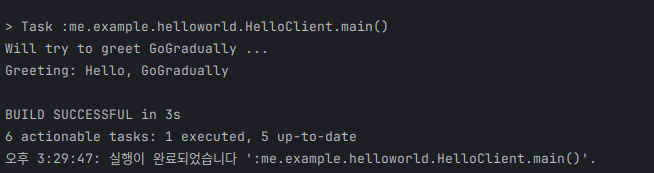
5. 빌드 및 실행
6. Spring 에서 사용해보기
스프링에서 이를 직접 사용해보고 테스트하기 위해,
컨트롤러가 직접 서비스를 호출하지 않고, gRPC 클라이언트를 통해 원격 서비스를 호출하도록 구현해보았다.
- 서버 초기화
package me.example.helloworld.compnent;

import io.grpc.Server;
import io.grpc.netty.NettyServerBuilder;
import me.example.helloworld.service.GreeterService;
import org.springframework.beans.factory.annotation.Value;
import org.springframework.context.SmartLifecycle;
import org.springframework.stereotype.Component;

import java.io.IOException;

@Component
public class GrpcServerLifecycle implements SmartLifecycle {
    private final Server server;
    private volatile boolean running = false;

    public GrpcServerLifecycle(GreeterService greeterService, @Value("${grpc.port:50051}") int port) {
        this.server = NettyServerBuilder.forPort(port)
                .addService(greeterService)
                .build();
    }
    @Override
    public void start() {
        try {
            server.start();
            running = true;
        } catch (IOException e){
            throw new IllegalStateException("Failed to start grpc server", e);
        }
    }

    @Override
    public void stop() {
        server.shutdown();
        running = false;
    }

    @Override
    public boolean isRunning() {
        return running;
    }

    @Override
    public int getPhase() {
        return Integer.MAX_VALUE;
    }
}- 클라이언트를 위한 stub 생성
package me.example.helloworld.config;

import io.grpc.ManagedChannel;
import io.grpc.ManagedChannelBuilder;
import me.example.helloworld.GreeterGrpc;
import org.springframework.beans.factory.annotation.Value;
import org.springframework.context.annotation.Bean;
import org.springframework.context.annotation.Configuration;

@Configuration
public class GrpcClientConfig {
  @Bean(destroyMethod = "shutdown")
  public ManagedChannel managedChannel(
          @Value("${grpc.client.host:localhost}") String host,
          @Value("${grpc.client.port:50051}") int port
  ) {
    return ManagedChannelBuilder
            .forAddress(host, port)
            .usePlaintext()
            .build();
  }

  @Bean
  public GreeterGrpc.GreeterBlockingStub greeterBlockingStub(ManagedChannel channel) {
    return GreeterGrpc.newBlockingStub(channel);
  }
}- 서비스 구현
package me.example.helloworld.service;

import io.grpc.stub.StreamObserver;
import me.example.helloworld.GreeterGrpc;
import me.example.helloworld.HelloReply;
import me.example.helloworld.HelloRequest;
import org.springframework.stereotype.Service;

@Service
public class GreeterService extends GreeterGrpc.GreeterImplBase {
    @Override
    public void sayHello(HelloRequest request, StreamObserver<HelloReply> responseObserver) {
        String message = "Hello, " + request.getName();

        HelloReply reply = HelloReply.newBuilder().setMessage(message).build();

        responseObserver.onNext(reply);
        responseObserver.onCompleted();
    }
}- 컨트롤러 구현
package me.example.helloworld.controller;

import me.example.helloworld.GreeterGrpc;
import me.example.helloworld.HelloReply;
import me.example.helloworld.HelloRequest;
import org.springframework.web.bind.annotation.GetMapping;
import org.springframework.web.bind.annotation.RequestParam;
import org.springframework.web.bind.annotation.RestController;

import java.util.Map;

@RestController
public class GreeterController {
    private final GreeterGrpc.GreeterBlockingStub stub;

    public GreeterController(GreeterGrpc.GreeterBlockingStub stub) {
        this.stub = stub;
    }

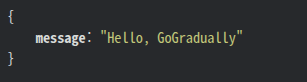
    @GetMapping("/api/hello")
    public Map<String, String> sayHello(@RequestParam String name) {
        HelloReply reply = stub.sayHello(HelloRequest.newBuilder().setName(name).build());
        return Map.of("message", reply.getMessage());
    }
}- 구현 결과
gRPC 내부 동작 이해하기
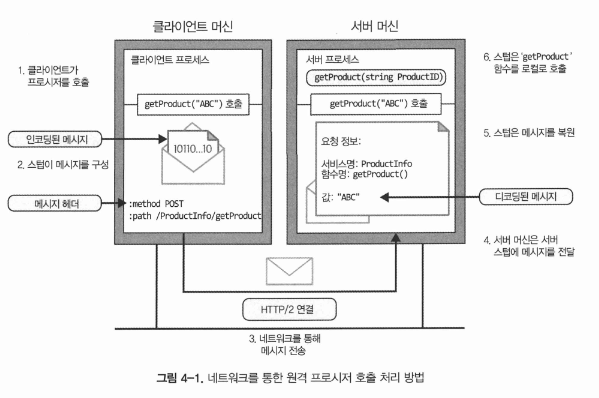
출처: kt cloud 기술 블로그 - gRPC의 내부 구조 파헤치기
gRPC의 내부 구조 파헤치기: HTTP/2, Protobuf 그리고 스트리밍
[kt cloud 플랫폼Innovation팀 강솔 님] gRPC의 내부 구조 파헤치기: HTTP/2, Protobuf 그리고 스트리밍 두 번의 포스팅을 통해 gRPC의 내부 동작 원리와 사용법에 대해 단계적으로 설명하고자 합니다.
tech.ktcloud.com
gRPC는 HTTP/2 프로토콜을 기반으로 하기 때문에, HTTP/2.0의 주요 특징들을 알고 있으면 이해하는 데 도움이 된다.
추천하는 글:
- HTTP/2.0과 HTTP/3.0의 등장 배경
- [HTTP/2.0 - HTTP 멀티플렉싱, HoL Blocking, 그리고 HTTP/3.0의 등장 배경
HTTP/2.0 - HTTP 멀티플렉싱, HoL Blocking, 그리고 HTTP/3.0의 등장 배경
HTTP/2.0의 등장 배경HTTP/1.1은 그 구현의 단순성과 명료함, 접근성으로 많은 사랑을 받아왔고, 받고 있다.하지만, 하나의 커넥션으로 여러 요청/응답을 처리하기 어렵고, 응답을 받아야만 그 다음
dev.go-gradually.me
Unary
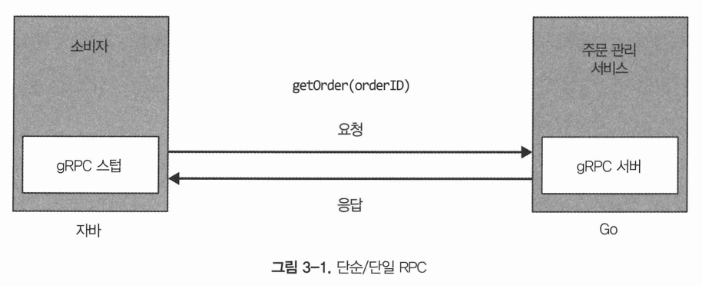
- REST와 마찬가지로 1:1 요청-응답 방식이다.
- Unary RPC의 경우에도 HTTP/2 멀티플렉싱을 활용하므로, 여러 개의 요청을 하나의 TCP 연결로 처리할 수 있다.
Server Streaming RPC
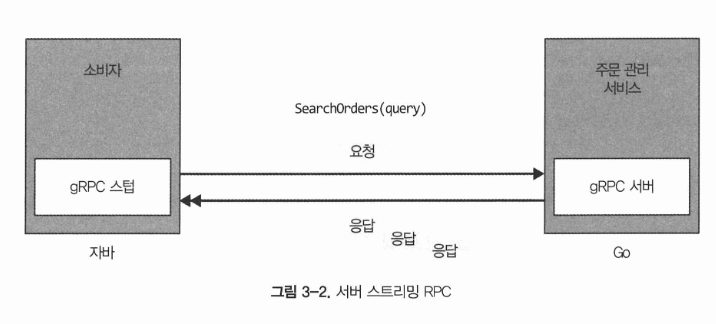
- 클라이언트 단일 요청에 대해 서버가 여러 개의 응답을 순차적으로 스트리밍한다.
- HTTP/2 서버 푸시와 유사하며, 로그나 실시간 데이터 전송에 유리하다.
Client Streaming RPC
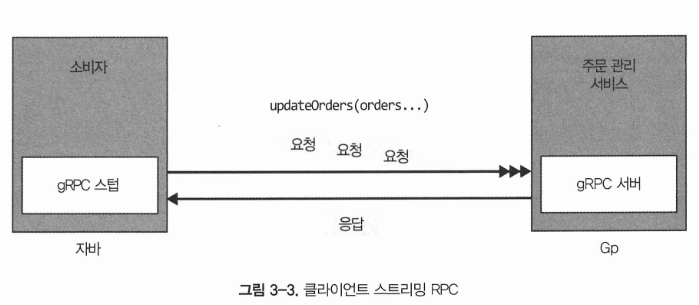
- 클라이언트가 여러 데이터를 순차적으로 전송하고, 서버가 한 번의 응답을 반환한다.
- 대용량 데이터 업로드 시 유용하다.
Bidirectional Streaming RPC
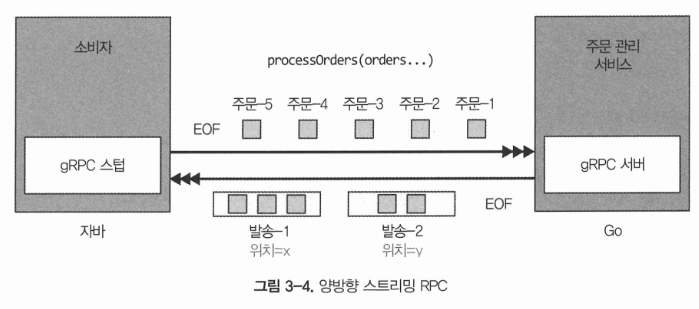
- 클라이언트와 서버가 동시에 데이터를 주고받을 수 있는 양방향 스트리밍을 제공한다.
- HTTP/2의 비동기 멀티플렉싱 덕분에 순서에 구애받지 않고 데이터를 주고받을 수 있다.
- 실시간 채팅 등 지속적인 데이터 교환 시 유리하다.
gRPC의 기본 문법
1. 파일 기본 구조(.proto)
syntax = "proto3";

package myapp.v1;

option java_package = "com.myapp.v1";
option java_multiple_files = true;
option java_outer_classname = "MyAppProto";

import "google/protobuf/timestamp.proto";syntax: proto2/proto3 선택. gRPC는 보통 proto3 사용.package: Protobuf 네임스페이스.option: 언어별 코드 생성 옵션(예: Java).import: 공용 타입(Timestamp 등) 또는 다른 proto 파일 포함.
2. 메시지(message) 문법
2-1. 필드 정의
message User {
  int64 id = 1;
  string name = 2;
  bool active = 3;
}- 필드 번호(
= 1,= 2): wire 호환성의 핵심. 변경/재사용에 주의. - 스칼라 타입 예:
int32,int64,uint32,uint64,sint32,sint64,bool,string,bytes,float,double
2-2. 반복(repeated)
message Group {
  repeated User members = 1;
}- 리스트/배열에 사용.
2-3. map
message Labels {
  map<string, string> values = 1;
}- key 타입은 보통 스칼라(주로 string/int) 제한이 있음.
2-4. 중첩 메시지 / enum
message Order {
  message Item {
    string sku = 1;
    int32 qty = 2;
  }

  enum Status {
    STATUS_UNSPECIFIED = 0;
    STATUS_PENDING = 1;
    STATUS_DONE = 2;
  }

  repeated Item items = 1;
  Status status = 2;
}- enum은 proto3에서 0 값(UNSPECIFIED)을 두는 관례가 강함.
2-5. oneof (서로 배타적인 필드)
message SearchRequest {
  oneof query {
    string name = 1;
    int64 id = 2;
  }
}- 한 번에 하나만 설정되는 필드 집합.
- “어떤 필드가 선택되었는지”를 구분해야 할 때 사용.
3. 서비스(service)와 RPC 정의
service UserService {
  rpc GetUser(GetUserRequest) returns (GetUserResponse);
}
다음과 같이 요청/응답 메시지를 별도로 정의한다.
message GetUserRequest {
  int64 id = 1;
}

message GetUserResponse {
  User user = 1;
}
4. gRPC 스트리밍 문법(4가지 패턴)
service ChatService {
  // 1) Unary: 단건 요청/단건 응답
  rpc Send(Message) returns (Ack);

  // 2) Server streaming: 단건 요청/다건 응답(서버 스트림)
  rpc Subscribe(SubscribeRequest) returns (stream Event);

  // 3) Client streaming: 다건 요청(클라이언트 스트림)/단건 응답
  rpc Upload(stream Chunk) returns (UploadResult);

  // 4) Bidirectional streaming: 다건 요청/다건 응답(양방향 스트림)
  rpc Chat(stream Message) returns (stream Message);
}stream키워드가 붙으면 해당 방향이 스트리밍.- 스트리밍은 보통 “실시간 이벤트”, “대용량 업로드”, “양방향 대화”에 사용.
5. 표준 Well-Known Types(대표)
google.protobuf.Timestamp: 시간google.protobuf.Duration: 기간google.protobuf.Empty: 빈 메시지(응답/요청에 내용이 없을 때)
예:
import "google/protobuf/empty.proto";

service Health {
  rpc Ping(google.protobuf.Empty) returns (google.protobuf.Empty);
}
6. 변경(호환성) 관련 기본 규칙
- 필드 번호는 재사용하지 않는 것이 원칙(삭제 후 다시 쓰면 해석 충돌 위험)이다.
- 필드 이름 변경은 보통 안전하지만(번호가 중요), 생성 코드/JSON 변환 등 영향을 고려해야 한다.
- 타입 변경은 제한적(예: int32 ↔ int64 같은 단순 변경도 언어/런타임에 따라 이슈 가능).
- 사용 중지 필드는
reserved로 잠그는 방식이 일반적이다.
message User {
  reserved 4, 5;
  reserved "old_field";
  int64 id = 1;
  string name = 2;
}'CS Repository > 네트워크 - Top-down Approach + @' 카테고리의 다른 글
| TCP의 다양한 추가 기능 - TFO, Nagle 알고리즘, 지연 ACK, Early Retransmit, Tail Loss Probe (0) | 2025.04.18 |
|---|---|
| TCP의 연결과 종료 과정 - 흐름제어, 혼잡제어, 재전송 제어, 3-way handshake, 4-way handshake (0) | 2025.04.18 |
| TCP란? 그리고 TCP 패킷의 형태, Selective ACK(SACK) (0) | 2025.04.18 |
| UDP (0) | 2025.04.18 |
| 포트 번호 (0) | 2025.04.17 |